Skip to content
NearNest

NearNest CRM

The CRM that runs the whole client file.

NearNest CRM takes a firm from first enquiry to final invoice: one record per client, every email and document on it, and AI that drafts and reads. Tailored to your kind of firm, and built first for law firms.

14-day free trial. No card needed to start.

Describe how your firm works. Watch the CRM do it.

Runs on the real CRM with a sample firm. No sign-up, and nothing is sent.

Amira Khan

Immigration, spouse visa

Matter IMM-0142
  1. Enquiry arrives

    Spouse visa question from the website form. A lead is created with the source recorded.

  2. Reply drafted

    AI drafts a first response from your template. A fee earner checks it and sends it.

  3. Passport received

    Uploaded through a secure link, scanned for malware, then read, classified and filed.

  4. ID and AML recorded

    Verification, PEP and sanctions status saved on the contact, with an expiry reminder.

  5. Matter opened

    IMM-0142 opened with its fee arrangement, task list and every email so far attached.

Example: how an enquiry becomes a matter in NearNest CRM.

Try it live

See it work on the real CRM.

Not a video and not a mock-up. Pick your role and the CRM sets up a sample firm, then walks you through it on the same screens your team would use. Do each step yourself or press Next. No sign-up, and nothing is sent.

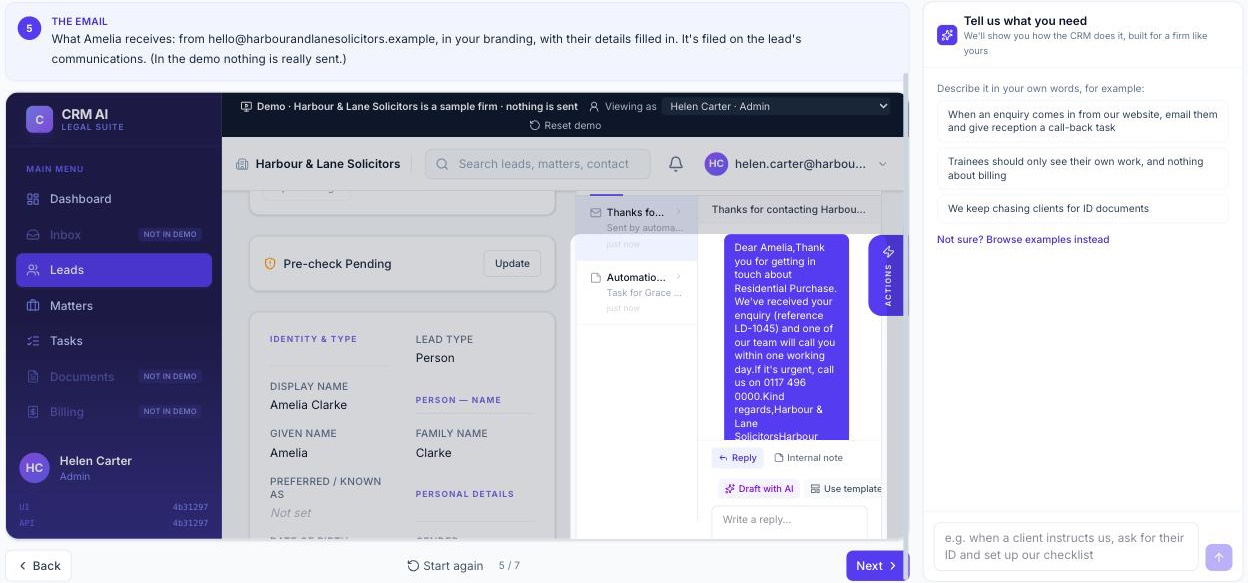
Explore: a guided step beside the real CRM, showing the automatic reply filed on a new enquiry, with the chat on the right
A website enquiry answered automatically, shown on the lead in the real CRM. Ask the chat for your own and it is built the same way.

Law firms first

Made for law firms, practice area by practice area.

Choose your practice area and the workspace arrives with its pipeline, stages, task lists, templates and roles.

  • Immigration

    Visas, entry clearance, appeals, settlement

  • Conveyancing

    Residential and commercial transactions

  • Family

    Divorce, child arrangements, financial orders

  • Employment

    Tribunals, settlement agreements

  • Corporate

    Formation, contracts, M&A

  • Criminal defence

    Police station and court work

  • Personal injury

    Claims, medical evidence, settlement

  • Wills and probate

    Wills, trusts, estate administration

And for other service firms.

The same CRM, set up for the way your firm works.

Tell us your sector and we'll show you
  • Estate agency

    Sales and lettings, with roles for agents, property managers and coordinators.

  • Accountancy

    Practices and bookkeepers, with roles for managers, accountants and client services.

  • Other professional services

    Consultancies and advisers: the same CRM with a general set-up you adjust.

  • Building and tradesComing soon

    Jobs, site visits and quotes.

Tailored, not configured from scratch.

Most CRMs start empty. NearNest starts with the set-up for your kind of firm, and your team adjusts it from there.

Roles for your kind of firm
Solicitors and caseworkers, agents and property managers, accountants and bookkeepers: each firm starts with roles and permissions that fit it.
Stages and task lists for the work
Law firms get the pipeline, stages and task lists for each practice area. Sector sets for other firms are on the way.
Templates and folders ready to use
Letters, emails, checklists and document folders to start from, which your firm adjusts.
Compliance built in
Client account, conflict checks, AML and regulator details for the firms that need them.
Your sector's own wordsComing soon
A matter for a law firm, an instruction for an agent, an engagement for an accountant.
Up and running in an afternoon.

  1. Step 1

    Sign up and choose your sector

    Law firms pick a practice area; other firms pick their sector. The workspace arrives set up for it.

  2. Step 2

    Connect email and invite the team

    Link your mailboxes, choose each person's role and send the invitations.

  3. Step 3

    Start working

    Take the next enquiry in the CRM. Adjust stages, templates and rules as you go.

No IT project

Nothing to install or host. It runs in the browser.

Settings in one place

Firm admins change users, roles, templates and rules themselves, and changes apply straight away.

Help from people

Report a problem or ask a question from inside the CRM, with a screenshot attached.

From the first call to the final invoice.

Win the work

Every enquiry captured, answered quickly and followed up.

Watch an enquiry get answered automatically →
Leads and pipeline
Track every enquiry by stage, source and owner, as cards or a list.
Website forms
Put enquiry forms on your own site. Describe what you need to ask and the form builder lays out the questions.
Drafted replies
AI drafts emails and letters from your own templates for you to review.

Run the work

One place for the client, the work and the paperwork, whether it's a matter, an instruction or a client file.

See a new instruction set itself up →
Client files and contacts
People, companies and their relationships, linked to each piece of work and its history.
Documents
Secure client upload links, malware scanning, OCR, auto-classification and summaries.
Tasks and deadlines
Task lists for each type of work, deadlines counted from the dates that matter, and reminders before they fall due.
Templates
Letters, emails and checklists the whole firm shares, filled in from the record.

Talk to clients where they are

Email, text and WhatsApp, all on the client's record.

See a client asked for their ID →
Email
Connect Google Workspace or Microsoft 365 mailboxes and send from your own domain. Mail files itself to the right client.
SMS
Text clients from a number we provide, or bring your own provider. Replies come back to the record.
WhatsApp
Message clients on WhatsApp with approved templates. Opt-outs are respected automatically.
One timeline
Every email, text and message in date order on the client, seen by the people who should see it.

Workflows that run themselves

Set the steps once. The CRM does the chasing.

Watch a quote get followed up →
Rules in plain English
Describe what should happen, like "when work moves to completion, set the closing tasks and email the client". You check the rule before it runs.
Stages that fit your work
Pipelines and stages to start from (set up per practice area for law firms), which you change as the firm changes.
Hand-offs without gaps
Work is assigned, chased and escalated, so nothing waits on someone remembering.

AI that assists, people who decide

AI does the reading and the first draft. Your team makes the call.

Assistant
Ask about a client or a piece of work and get an answer from what is on file.
Reads documents
Summaries, key details pulled out and documents sorted into the right place.
Drafts for review
Emails, letters and templates written in your firm's style, never sent without a person.
Usage you control
Each AI feature can be switched on or off, and usage is capped by plan.

Your team, your rules

The right people see the right work, and nothing more.

See what a trainee can and can't see →
Roles and permissions
Start from the roles set up for your kind of firm or build your own, down to who can view, edit, share or approve.
Teams and departments
Keep work within the team handling it. Restrict sensitive work and privileged documents.
Single sign-on
Sign in with Microsoft, Google or your firm's own identity provider, with your password rules.
Audit trail
A record of who looked at, changed or sent what, and when.

Bill and stay compliant

Get paid on time and keep the regulator's questions answered.

See an AML result reach compliance →
Invoicing
Fixed fee, hourly or staged billing, partner review, credit notes and payments.
Client account
Trust ledger and disbursement requests with fee earner, partner and finance approval.
AML and KYC
Verification, PEP and sanctions status on every contact, with expiry alerts.
Compliance registers
Complaints, conflicts, risks, data breaches and subject access requests, logged and tracked in one place.
Client portalComing soon
Clients follow progress, share documents and pay invoices.

Made for client confidentiality

Your data stays in the UK

Hosted on AWS in London (eu-west-2).

Each firm is kept apart

Every firm has its own sign-in and its own document storage.

AI you can see and cap

Usage is metered per feature and capped by plan, so there are no surprise bills.

Built for regulated firms

Permissions by role and team, and a full audit trail of who did what.

See it set up for your firm.

Tell us your practice area or sector and we'll walk you through the CRM as your team would use it.

Pricing

One fee for the firm, with a user limit and monthly allowances included. Every plan starts with a free trial.

Starter

Up to 10 users

£250a month

Excludes VAT.

  • 10,000 emails a month
  • 50 GB document storage
  • 500 pages of document reading (OCR)
  • AI assistant included
Prices above the allowance
AI usage
cost + 30%
Storage
£0.1 per GB a month
Email
£1 per 1,000
OCR
£0.02 per page
SMS
£0.05 each
WhatsApp
£0.05 each
Start 14-day free trial

Growth

Up to 35 users

£600a month

Excludes VAT.

  • 50,000 emails a month
  • 250 GB document storage
  • 2,500 pages of document reading (OCR)
  • AI assistant included
Prices above the allowance
AI usage
cost + 30%
Storage
£0.1 per GB a month
Email
£1 per 1,000
OCR
£0.02 per page
SMS
£0.05 each
WhatsApp
£0.05 each
Start 14-day free trial

Larger firms

More users, higher allowances, single sign-on and a contract that fits how you buy.

Talk to us about a plan

Questions firms ask

Is it only for law firms?

No. Law firms are where we started and the CRM is set up for each practice area. Estate agents, accountants and other professional service firms use the same product with roles for their kind of firm, and sector set-ups for them are on the way.

How long does it take to get started?

Sign up, choose your sector or practice area and your workspace is ready in a few minutes, set up for that kind of work.

Do I need a card for the trial?

No. Add a card or Direct Debit before the trial ends to keep going. If you don't, the account pauses and nothing is charged.

Can we bring our existing email?

Yes. Connect Google Workspace or Microsoft 365 mailboxes and send from your own domain.

What happens when we use more than the plan includes?

Usage above the monthly allowance is billed at the published rates the following month. You can ask us to cap it instead.

Can we leave and take our data?

Yes. Firm admins can export all records and documents as a download, including during the notice period.

Something else? Send us a message.